트위터 API가 유료화된 지금, 무료로 쓸 수 있는 소셜 API가 있다
2023년 트위터(현 X)가 API를 유료화하면서 수많은 개발자들이 대안을 찾아 나섰다. 월 $100짜리 Basic 플랜도 하루 요청 수 제한이 빡빡해서, 작은 사이드 프로젝트 하나 돌리기도 부담스러운 게 현실이다.
그런데 Bluesky는 다르다.
현재 Bluesky API는 인증 없이도 공개 데이터를 읽을 수 있고, 계정만 있으면 쓰기 작업까지 완전 무료로 가능하다. 게다가 AT Protocol이라는 오픈 표준 위에 만들어져 있어서, API 구조 자체가 개발자 친화적으로 설계되어 있다.
블루스카이 API에 대한 공식 문서는 아래와 같다.
https://docs.bsky.app/docs/get-started
Get Started | Bluesky
Make your first post to the Bluesky app via the API in under 5 minutes.
docs.bsky.app
문서를 살펴보면 타임스크립트에서 다음과 같이
import { BskyAgent } from '@atproto/api'파이썬에서 다음과 같이 AT Protocol 패키지를 이용한 것을 알 수 있다.
from atproto import Client
다양한 튜토리얼 또한 제공하고 있다.
우리는 그중 Bots을 생성할 수 있는 템플릿을 살펴보도록 하겠다. 공식 문서는 아래와 같고
https://docs.bsky.app/docs/starter-templates/bots
Bots | Bluesky
Bots are accounts on the network that post automatically. Popular ones include bots that post the magnitude of recent earthquakes, photos from an archive on a regular schedule, etc.
docs.bsky.app
아래 쿡북을 이용해 바로 실행해볼 수 있다.
https://github.com/bluesky-social/cookbook/tree/main/ts-bot
cookbook/ts-bot at main · bluesky-social/cookbook
A collection of example projects and scripts for atproto development. - bluesky-social/cookbook
github.com
위 코드를 클론해서 아래 명령어로 .env를 생성해 주고 블스 아이디와 비밀번호를 입력해 준다. 해당 파일은 절대 깃허브에 올리지 않도록 한다.
cp example.env .env
node index.js 를 실행하면 당신의 블루스카이 계정은 스마일리 이모티콘🙂을 3시간마다 포스팅하는 봇이 된다.
Github Actions란?
간단하게 말하자면 GitHub Actions는 코드 저장소에서 특정 이벤트가 발생하면 자동으로 작업을 실행해 주는 자동화 도구이다.
레포지토리에 .github/workflows 아래 yml 파일을 추가하면 실행된다. 아래 GitHub Actions에 붙인 블루스카이 봇 코드를 찾아 참고했다.
https://github.com/philnash/bsky-bot
GitHub - philnash/bsky-bot: A template for making Bluesky bots that post on their own schedule
A template for making Bluesky bots that post on their own schedule - philnash/bsky-bot
github.com
사실 그냥 공식 템플릿에 Actions 파일만 추가하면 된다. 배포할 레포지토리에서 Actions 탭에서 New workflow를 클릭해 Github가 제공하는 workflow Template을 사용할 수도 있다. 개인적으로 작성하려면 set up a workflow yourself를 클릭하면 작성할 수 있다.

다양한 템플릿들을 살펴보면 어떻게 작성할지 어느정도 감이 잡힐 것이다. 물론 Git에서 공식 문서 또한 제공하고 있다.
대략적으로 자주 사용하는 값들을 살펴보면 아래와 같다.
핵심 용어
| workflow | 전체 자동화 파이프라인 |
| trigger (on) | 언제 실행할지 (push, PR 등) |
| job | 하나의 작업 단위 |
| step | job 안의 세부 명령어 |
| runner | 실행 환경 (ubuntu, windows 등) |
그리고 .env로 빼주었던 환경변수는 Settings > Security > Secrets and variables > Actions에서 추가해 줄 수 있다.

DeepL API 사용하기
DeepL은 API 사용이 쉽고 월 최대 5만자까지 무료로 제공되며 번역이 자연스럽기로 유명해서 선택하였다. 우선 DeepL에 계정을 생성하고 API키를 발급하면 사용할 수 있다.

가입한 후 오른쪽 위 사용자 프로필 아이콘 > 계정 > API 키 & 한도에서 발급 할 수 있다.
아래는 내가 DeepL API을 사용한 코드이다.
import * as deepl from 'deepl-node';
import { deeplAuthKey } from './config.js';

let translator: deepl.Translator | null = null;

function getTranslator(): deepl.Translator {
  if (!translator) {
    if (!deeplAuthKey) {
      throw new Error('DEEPL_AUTH_KEY 환경변수가 설정되지 않았습니다.');
    }
    translator = new deepl.Translator(deeplAuthKey);
  }
  return translator;
}

export async function translateToKorean(text: string): Promise<string> {
  const t = getTranslator();
  const result = await t.translateText(text, null, 'ko');
  return result.text;
}
index.ts 에서 다음과 같이 사용한다.
import { translateToKorean } from "./lib/translate.js";

...

const instructions = await translateToKorean(drink.strInstructions);
보시다시피 DeepL API 키 또한 보안을 위해 환경변수로 빼주었다. Git Secrets에도 잊지 말고 추가해 주자.
아래는 DeepL API 문서이다.
https://developers.deepl.com/docs/getting-started/intro
Introduction - DeepL Documentation
Welcome to the developer home of DeepL API.
developers.deepl.com
다양한 API를 활용할 수 있지만 나는 API 키가 필요 없는 TheCocktailDB를 사용하였다. Git Actions 로그와 실제 Bot의 이미지.
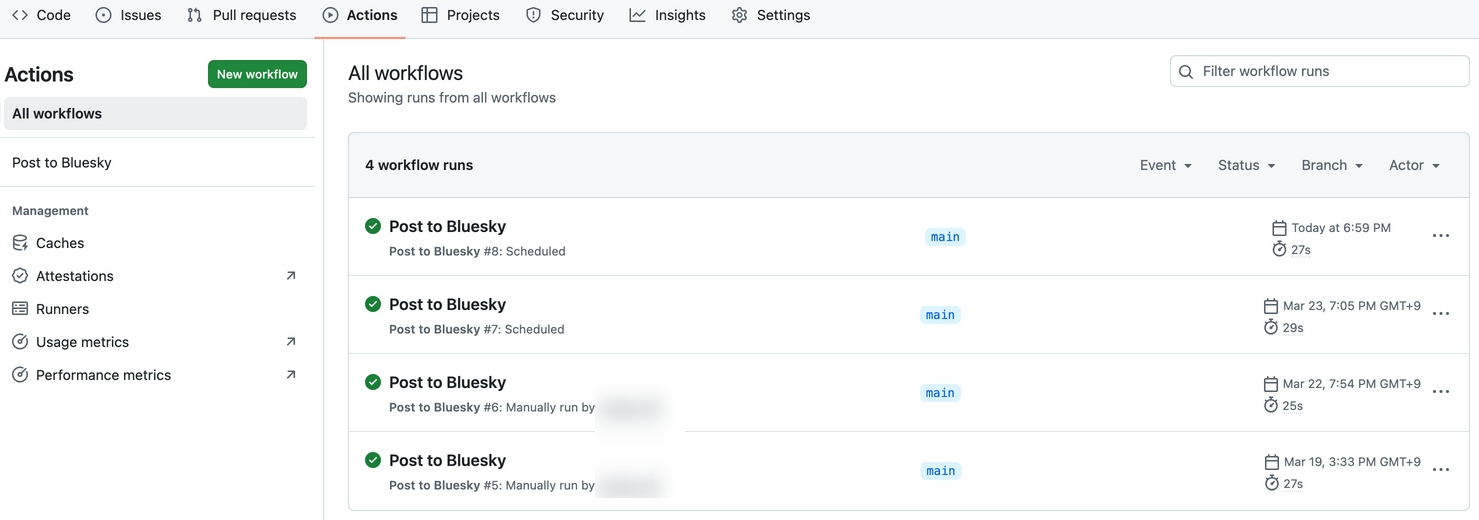
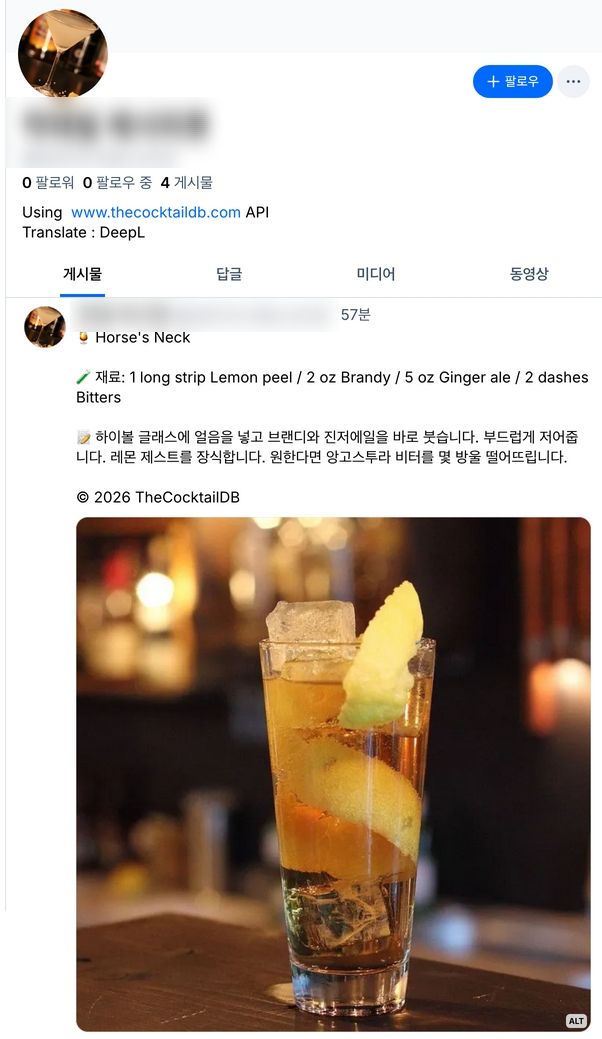
Actions에 Cron 시간은 UTC 기준이니 오후 7시에 업데이트 하고싶다면 0 9 * * * 를 입력해야한다.
무료 API는 아래 링크에 굉장히 많이 소개되어 있다. 많이들 날씨나 뉴스 그리고 환율 API 사용하는 것 같다. 아래 목록에서 적절한 API를 찾아 본인만의 봇을 생성해 보자. 그리고 출처를 꼭 표시해 주도록 하자.
https://github.com/dl0312/open-apis-korea
GitHub - dl0312/open-apis-korea: 🇰🇷 한국어 사용자를 위한 서비스에 사용하기 위한 오픈 API 모음
🇰🇷 한국어 사용자를 위한 서비스에 사용하기 위한 오픈 API 모음. Contribute to dl0312/open-apis-korea development by creating an account on GitHub.
github.com
'IT' 카테고리의 다른 글
| Dozzle - Docker 컨테이너 로그 통합 웹UI (0) | 2026.03.31 |
|---|---|
| GitHub Copilot 이용 시 AI 학습데이터로 이용? (0) | 2026.03.28 |
| Docker Compose로 기본 개발환경 구축하기 (0) | 2026.03.25 |
| Tailscale 소개, 설치 및 실행, 장단점 (0) | 2026.03.13 |


